
A good IT help desk SLA promises a 15-minute response for business-stopping issues, a response within one business day for low-priority requests, and a separate fix-time target for every priority level. If a contract only says “fast support” or “best effort,” there is no SLA at all, just a hope.
This guide explains what a help desk SLA should cover, the response and resolution times small and mid-sized businesses should expect, and the red flags we see most often when new clients share their old IT contracts with us.
What is an IT help desk SLA?
An IT help desk SLA (service level agreement), often called an IT support SLA, is the part of your IT support contract that defines how quickly your provider must respond to and fix problems. It turns “we’ll take care of you” into written, measurable commitments.
A complete SLA covers four things: how each ticket priority level is defined, how fast a technician responds, how long a fix should take, and what happens when the provider misses a target. Without all four, nobody can be held accountable when your team is stuck.
Response time vs resolution time: what’s the difference?
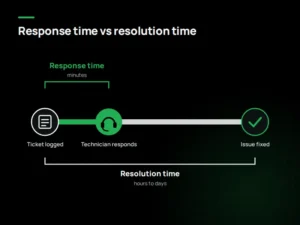
Help desk response time is how long it takes a technician to acknowledge your ticket and start working on it. Resolution time is how long it takes to actually fix the problem. Many contracts only promise the first one.
That gap matters. A provider can reply “we’re looking into it” in five minutes and still leave your email down for two days. Always ask for both numbers, in writing, for every priority level.
| Priority | Example | Response target | Resolution target |
| P1 – Critical | Whole office offline, server down, suspected ransomware | 15 minutes, 24/7 | 4 hours |
| P2 – High | A department can’t work, phones down for a team | 1 hour | 8 business hours |
| P3 – Medium | One user’s laptop failing, printer down | 4 business hours | 2 business days |
| P4 – Low | New software request, minor settings change | 1 business day | 5 business days |
What response times should a small business expect?
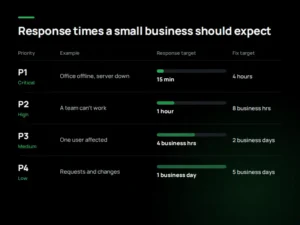
Response targets should scale with business impact. The benchmarks below are what we recommend clients hold any IT provider to, including us.
Two details make these numbers meaningful. First, P1 coverage should be 24/7, because outages and ransomware don’t wait for business hours. Second, resolution targets need a clear “clock stops” rule: the clock should pause only while the provider is waiting on you, never while it waits on its own vendors.
What should a help desk SLA include?
A strong SLA reads like a checklist, not a marketing page. Before you sign, confirm the contract covers:
- Priority definitions with real examples, so a critical issue can’t be quietly downgraded later
- Response and resolution targets for each priority level
- Support hours and channels: phone, email, portal, and after-hours coverage
- Escalation path: who takes over when a tier 1 support can’t fix it, and how fast
- Onsite support terms: whether visits are included and how quickly a technician arrives
- Monthly reporting on tickets, response times and SLA compliance
- Remedies: service credits or other consequences when targets are missed
If you’re comparing quotes, these items explain most of the price difference between providers. Our breakdown of how SLA levels affect managed IT pricing shows where the money goes.
5 red flags in an IT help desk SLA
These are the problems we find most often when reviewing contracts from other providers.
- “Best effort” language. It means no commitment. Ask for numbers, or walk away.
- Response time only. Without resolution targets, a fast reply and a slow fix are both “within SLA.”
- Business hours only for critical issues. If systems fail at 7 p.m. on a Friday, you wait until Monday.
- Auto-replies counted as responses. An automated email is not a technician working on your problem.
- No reporting. If the provider never shows you its SLA performance, you can’t know whether it’s meeting it.
How do you know if your provider is meeting its SLA?
Ask for a monthly SLA report and review three numbers: the share of tickets answered within the response target, the share resolved within the resolution target, and the number of repeat tickets for the same issue.
Repeat tickets are the number most businesses miss. A provider can hit every response target while fixing symptoms instead of causes. If the same user reports the same problem three times in a month, that’s a root-cause failure, even if each ticket closed on time.
Proactive tools also reduce how often you need the help desk at all. With 24/7 monitoring, many server and network problems are caught and fixed before anyone opens a ticket.
How Foris approaches help desk SLAs
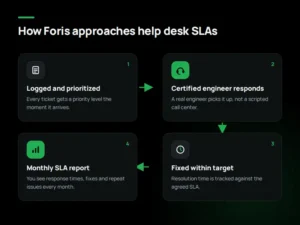
At Foris, every client gets written response and resolution targets for each priority level, so you always know how quickly we’ll act when something breaks. Your tickets go straight to certified engineers with Cisco and Microsoft credentials, not to a scripted call center. Every month, you receive a report showing how we performed against those targets, including response times, fixes and any repeat issues, so you can check our work instead of taking our word for it. To see what our SLA would look like for your business, call our team at (830) 515-4565.
You can see the details in our help desk response commitments, or read how our team delivers IT support for Austin businesses both onsite and remotely.
Frequently asked questions
What is a good response time for an IT help desk?
For critical issues that stop work, 15 minutes or less, 24/7. For routine requests, a response the same business day is reasonable. Anything vaguer than a number per priority level is a warning sign.
What is the difference between an SLA and an SLO?
An SLA is the formal, contractual commitment, with consequences if it’s missed. An SLO (service level objective) is an internal target a provider aims for. Only the SLA protects you, so make sure the numbers are in the contract itself.
Do help desk SLAs cover after-hours support?
Only if the contract says so. Many SLAs cover business hours only. If your business can’t afford to wait overnight, confirm in writing that P1 issues get a 24/7 response.
What happens if a provider misses its SLA?
That depends on the contract’s remedies clause. Common remedies include service credits, a discounted month, or the right to cancel after repeated misses. If there’s no remedies clause, a missed SLA has no consequence.
Should onsite support be part of the SLA?
Yes, if your business relies on physical hardware such as servers, phones or network equipment. Ask for a written onsite arrival time for critical issues and whether travel time is billed separately.
Get a help desk that puts its response times in writing
Not sure your current IT provider would pass this checklist? Send us your existing contract and we’ll review it for free, pointing out where your SLA is strong, where it’s vague, and what fair response times look like for a business your size. No pressure, just a clear answer.